
Reinstall all your apps after a fresh Windows install
Post-Format Setup is a small program for the moment right after you've formatted your PC. Tick the apps you use, press Install, and it downloads and installs them one by one while you do something else. No hunting through websites, no clicking "Next" twenty times.
It installs everything through winget, the package manager that comes with Windows, so the apps come from their official sources.
Download PostFormatInstaller.ps1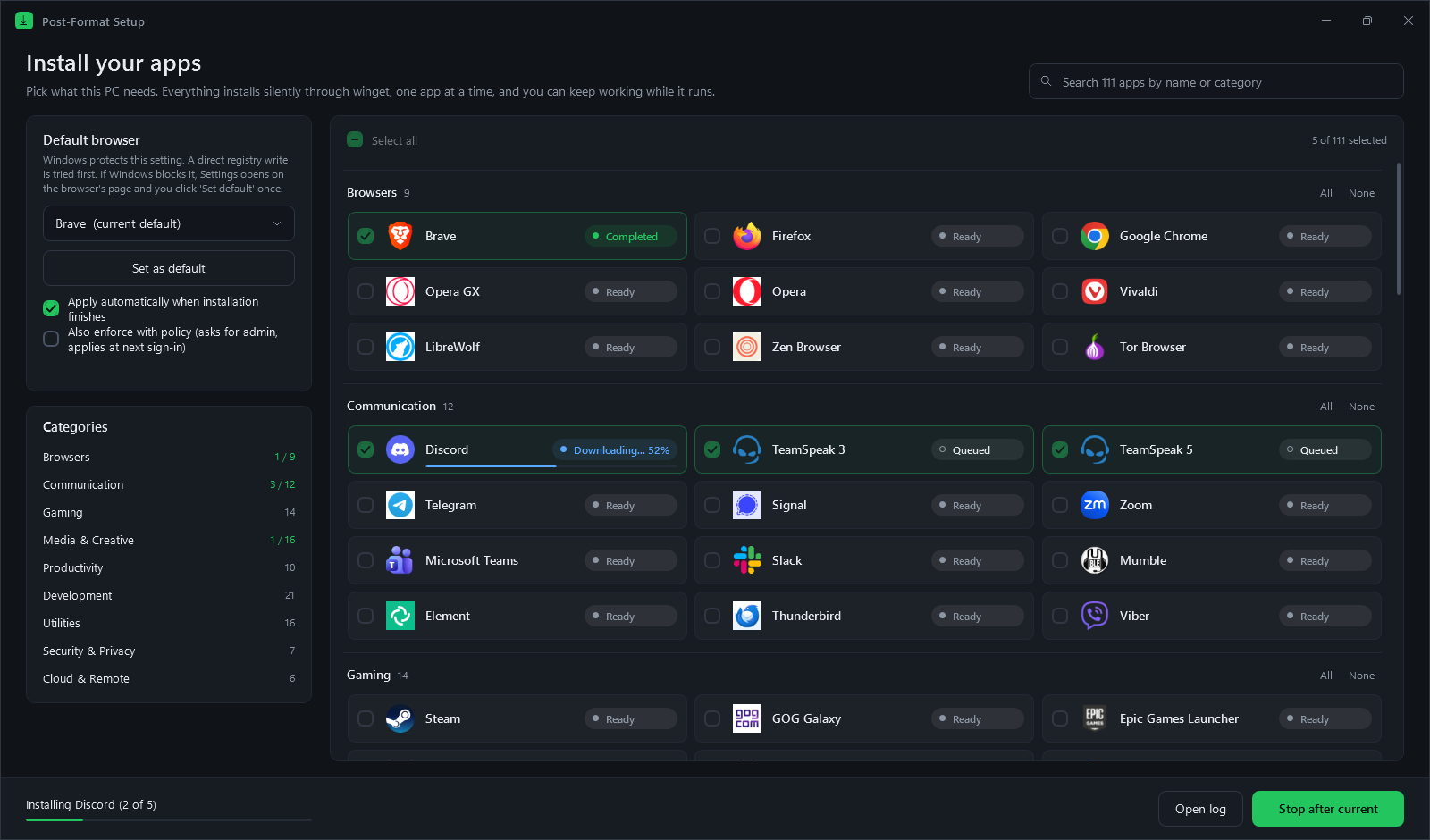
What it can install
111 apps in total. A few of them:
- Gaming
- Steam, GOG Galaxy, Epic Games, EA app, Ubisoft Connect, Battle.net
- Chat
- Discord, TeamSpeak 3 and 5, Telegram, Signal, Zoom, Slack
- Browsers
- Brave, Firefox, Chrome, Opera GX, Vivaldi
- Media
- Spotify, VLC, OBS Studio, Audacity, GIMP, Blender
- Coding
- VS Code, Git, Node.js, Python, Docker, Notepad++
- Everyday
- 7-Zip, LibreOffice, Acrobat Reader, Bitwarden, PowerToys
Apps you already have are detected and skipped. It can also set your default browser.
How to use it
- Download the file above. If your browser asks, choose Keep.
- Right-click PostFormatInstaller.ps1 and choose Run with PowerShell. On Windows 11 it's under Show more options. Don't pick "Run as administrator".
- Tick the apps you want and press Install.
- When the bottom of the window says Finished, close it.
Windows will ask for permission for some apps. Before you click Yes, check that the name and the publisher match an app you picked, for example "Steam Setup" from Valve Corp. If something looks wrong, click No. That app is skipped and the rest keep going.
Is it safe?
It's a single plain-text script. You can open it in Notepad, or read it on GitHub, before running it. It has no ads, no tracking and no account. This exact file was checked by more than 70 antivirus engines on VirusTotal.
To make sure your copy is the same file, run Get-FileHash .\PostFormatInstaller.ps1 in PowerShell. The result should be:
B70E0FAA633EE4EDF7234D842829588B67B5F9422A22A5D55F33C17C9B0AE57E